What’s new in version 3?
Please download the latest version to take advantage of the new features, many other minor improvements and bug fixes.
This page lists what has changed across the Version 3 releases, with the newest release at the top.
What’s new in version 3.1?
Highlights: the Automatic Page Filler, a new Publications tab, a Printers tab for comparing print costs, a Cover Wizard, a faster Layout Only mode, and many improvements for diglots and polyglots.
Significant new features:
- Automatic Page Filler (experimental)
- Fills the pages of a whole book for you. It shrinks or expands individual paragraphs to remove underfilled pages and short last lines, so you don’t have to adjust paragraphs by hand.
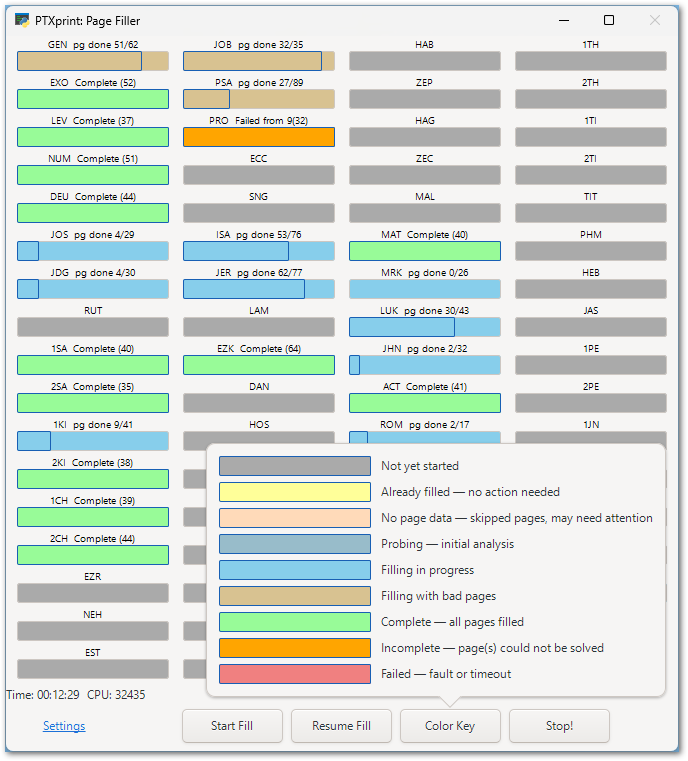
- Start it from the PDF Viewer. Several books can be filled at the same time, with a progress display for each book. Books that are finished show in green, and a Color Key button explains the other status colours.
- The settings on the Advanced tab are now grouped into Speed and Quality settings with clearer tooltips.
- New Publications tab
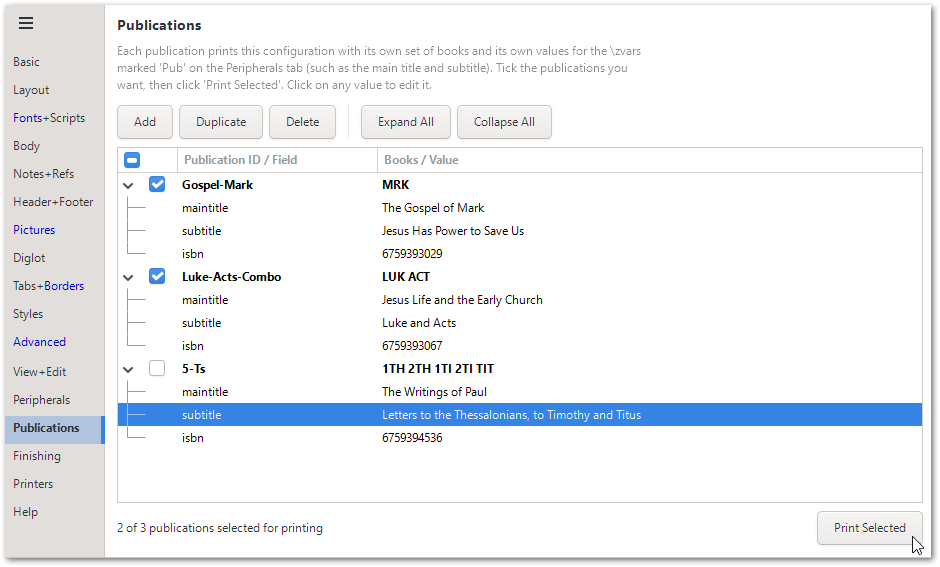
- Define several publications from one configuration, for example a New Testament, a Gospel of Luke, and a Psalms booklet. Each publication has its own books, titles and other variables.
- Tick the publications you want and click Print Selected to produce them all in one go. PTXprint opens the output folder when it has finished.
- Multiple publications can also be printed from the command line with
--pub(or-B).
- Printers tab: compare printing costs
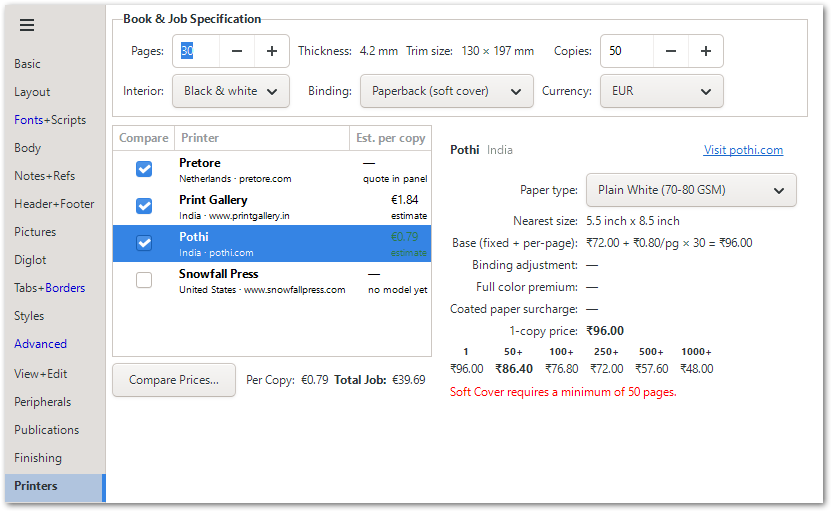
- Describe your print job once and compare estimated prices from several print-on-demand printers, including Pretore and a few sample PoD providers.
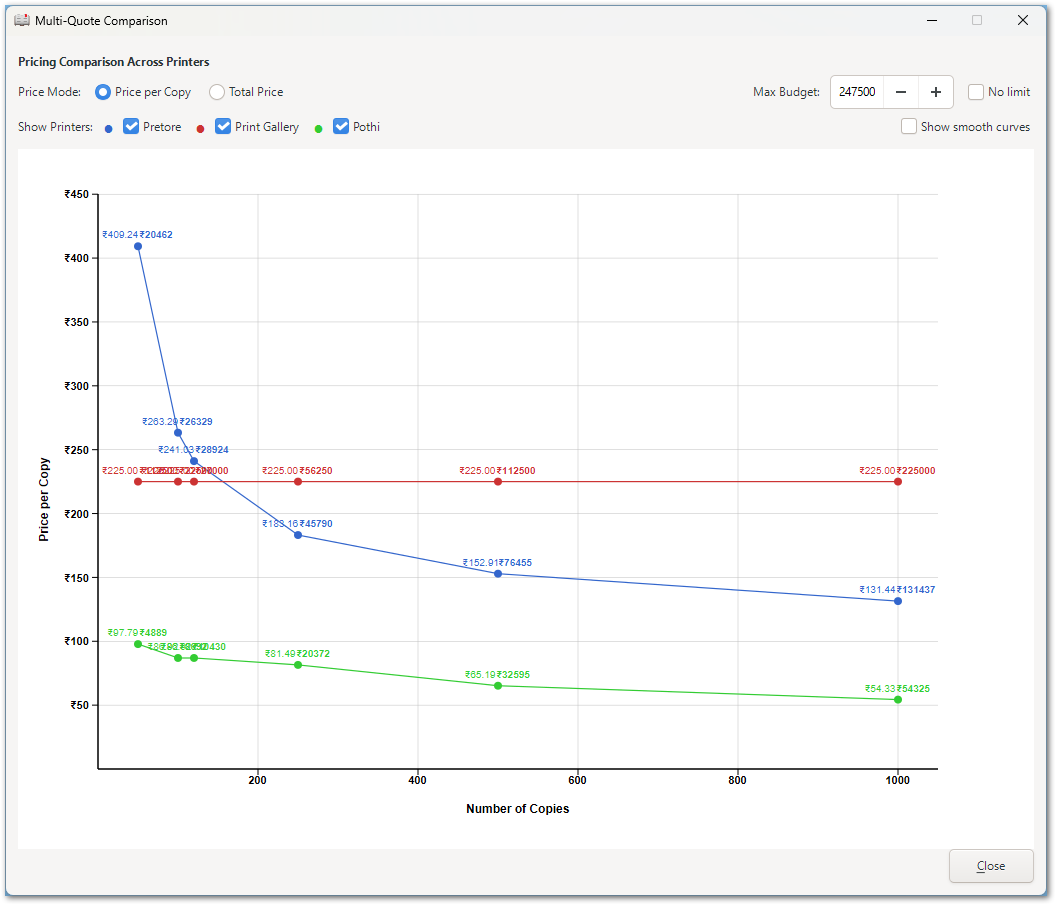
- A graph shows the cost comparison at a glance, and prices from different printers are converted to the same currency.
- Describe your print job once and compare estimated prices from several print-on-demand printers, including Pretore and a few sample PoD providers.
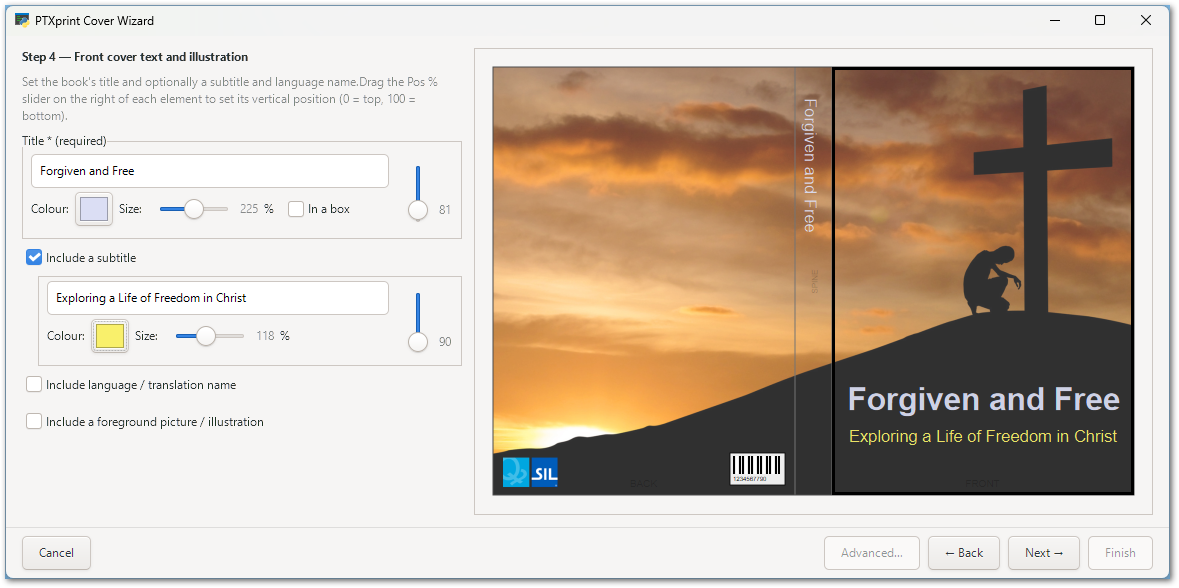
- Cover Wizard (work in progress)
- The Cover tab has been replaced by a Cover Wizard, which you open from the top of the Peripherals tab.
- It supports background images (which can be cropped and positioned), colours, borders, rotated spine text, and the hinge allowance for hardback covers.
- Covers without a spine (e.g. saddle-stitched booklets) no longer get spine crop marks or bleed.
- Layout Only mode: much quicker re-runs
- When only the layout is being changed, PTXprint can skip re-processing the USFM text on every run, which makes adjusting pages much quicker.

- The above Layout Only setting turns itself off temporarily when it needs to: when you edit a setting which affects layout, or change the books being typeset or the chapter range.
- New shortcuts: Shift/Ctrl+Left-click and Shift/Ctrl+Right-click on a paragraph in the PDF Viewer apply adjustments to the paragraph, so you can make several adjustments quickly.
- The Make Diff checkbox has moved to the Finishing tab to make room for this option, and is now labeled as “Compare PDFs”.
- When only the layout is being changed, PTXprint can skip re-processing the USFM text on every run, which makes adjusting pages much quicker.
- Diglot and polyglot improvements
- Study notes now work in diglots, with better space calculation. Separate and combined note styles can be mixed.
- Text borders can surround just selected columns, for example only the Greek text in an English–Greek diglot. They can also surround just the verse text when a book has an introduction.
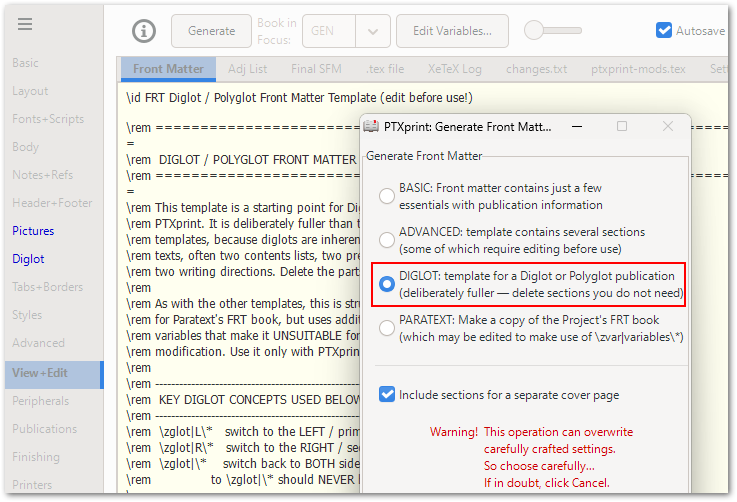
- A new Diglot Front Matter template.
- Pictures can come from more than one project. The PDF Viewer can switch between polyglot views, and diglot settings are now saved in the PDF.
- Diglot is safer to switch on and off. PTXprint explains what enabling a diglot involves and shows the project selector for the secondary project. When you disable a diglot, it offers to Save as Monoglot….
- Many fixes to line spacing, note positions, page-full calculations and merging.
- Pictures
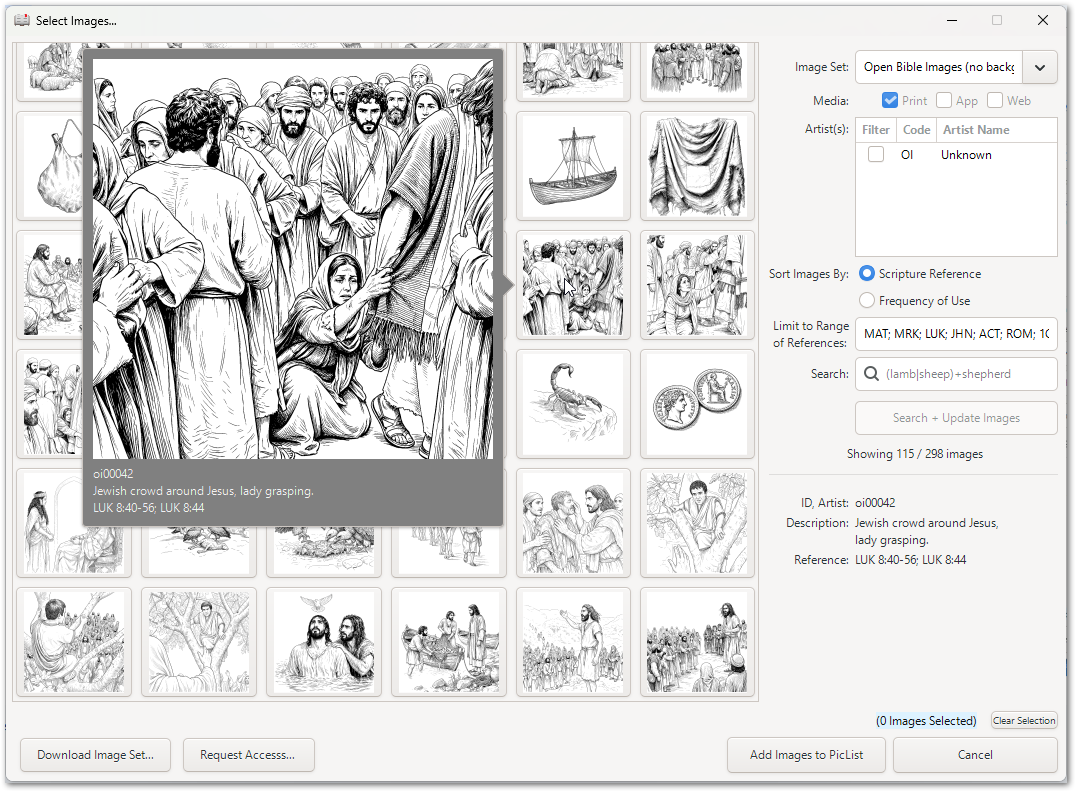
- The Picture Catalogue is more responsive and easier to work with, and the ImageSet downloader has been improved.
- The Picture List shows missing pictures in grey and highlights rows with problems (such as a scale error), with a tooltip explaining what is wrong.
- A new right-click menu in the Picture List includes copying a picture’s details to the clipboard in USFM format.
- Pictures load much faster, which speeds up starting PTXprint and switching configurations.
- Picture references to bridged verses (e.g. 3-4) are resolved correctly, and when a picture has several possible anchors, PTXprint chooses the first one that is in the books being printed.
- PDF Viewer
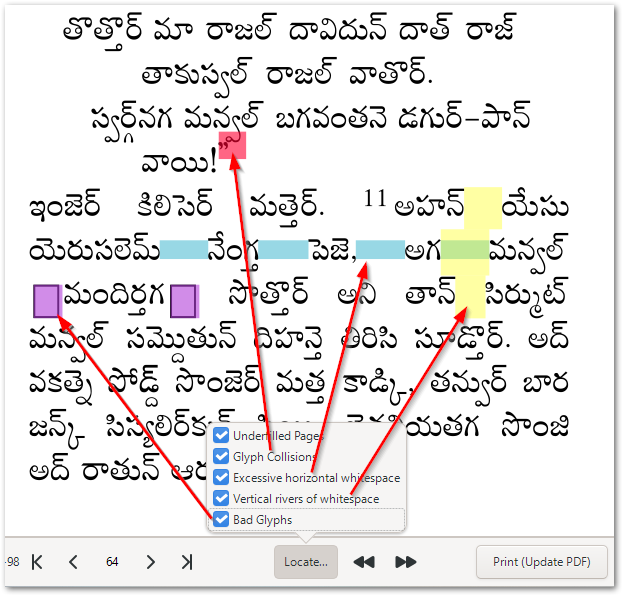
- Missing glyphs (shown as boxes, often called “tofu”) are highlighted in purple, so a font that lacks characters is easy to spot.
- Glyph-collision detection is now more precise (but note that the option needs to be enabled in Advanced settings).
- Detailed status messages now show up in the tooltip of the (i) button with counts of information, warning and error messages.
- The right-click menu has colour-coded options, tooltips that explain the keyboard and mouse shortcuts, and a new option to reset all adjustments until the end of the book.
- Zooming and scrolling work more smoothly (Ctrl+scroll works anywhere in the viewer).
- New kinds of content
- Custom lists, such as a List of Measurements or a List of Prayers, can be generated using
\DefineListOf,\zlistentryand\ztoc. - Marginal notes and side-aligned notes are supported.
- Initial support for Markdown input using a conversion script for .md resources (ask for support if this feature is needed).
- Ornament patterns can define a group of ornaments that repeats as a group.
- Custom lists, such as a List of Measurements or a List of Prayers, can be generated using
General enhancements:
- Updated to TeX Live 2026 on Windows.
changes.txtcan now call functions, andinchanges can match across several lines (see snippets.md in the documentation).- New Advanced controls for the hyphenation word list.
- New Underline control on the Styles tab.
- The chapter-pair separator can now be changed, and PTXprint uses the range separators set in the Paratext project settings.
- When a font is missing, PTXprint now tells you which styles use it in the error message and status report.
- Bad UTF-8 data in a USFM file no longer stops the job. The bad characters are replaced and listed in the report.
- USFM checks have been added to the typesetting report.
- PDFs are named using the book’s main title (when there is one) instead of the project’s full name.
- Only one font (Charis) is now required, and it is included with PTXprint.
- If PTXprint finds more than one Paratext projects folder when it first starts, it lets you choose which one to use.
- The book list copes better with wrong book names or codes, and a Toggle Books button has been added to the book chooser.
- Interlinear text can now be used without specifying a language (when
\rbis already provided). - The
-Scommand-line option is now needed before external scripts will run during command-line printing, for safety. - A new automated regression-testing framework, which can record tests from the GUI.
Minor UI improvements:
- On Advanced > Other, you can show just the settings that differ from the defaults, and Ctrl+Click highlights a setting.
- The Copy Configuration to… dialog now has a list of recently used projects.
- Use Tab to move between rows and values in the Variables table.
- Generated values have been added to the header drop-down lists.
- The main window takes less vertical space, and the Project drop-down list scrolls.
- A link to the PTXprint Master Slides has been added to the Help tab.
- The TechRef documentation now opens in your system’s PDF viewer (not the PDF Preview pane), so you can search for content in it.
- “Jump to Ref in Paratext” now brings Paratext to the front.
- A warning message closes itself after 30 seconds and the job carries on.
GitHub issues fixed:
#534, #1093, #1096, #1125, #1127, #1142, #1143, #1157, #1160, #1161, #1162, #1163, #1164, #1165, #1166, #1175, #1231, #1243, #1245, #1249
Other bug fixes:
- Tables that run onto more than one page (including Tables of Contents) are no longer cut off, and multi-line cells line up correctly.
- Right-to-left Tables of Contents (without leaders) and right-to-left merged notes now work.
- Inline Strong’s numbers no longer cut off the text that follows them.
- Images no longer go missing because of padding, and big pictures and bottom pictures (including in diglots) appear where they should.
- Repeated footers, repeated images and duplicated notes at the end of a book have been fixed.
- Fixed a Windows hang after “Laying out…” when printing or previewing.
- Fixed pictures in non-Scripture books, in modules and in the Glossary.
- Many smaller fixes to cross-references, verse ranges, footnote spacing and page numbering.
What’s new in version 3.0?
Version 3.0 makes PTXprint easier to start using. It also adds a tabbed PDF Viewer and an improved Styles tab.
Significant new features:
- Easier to get started
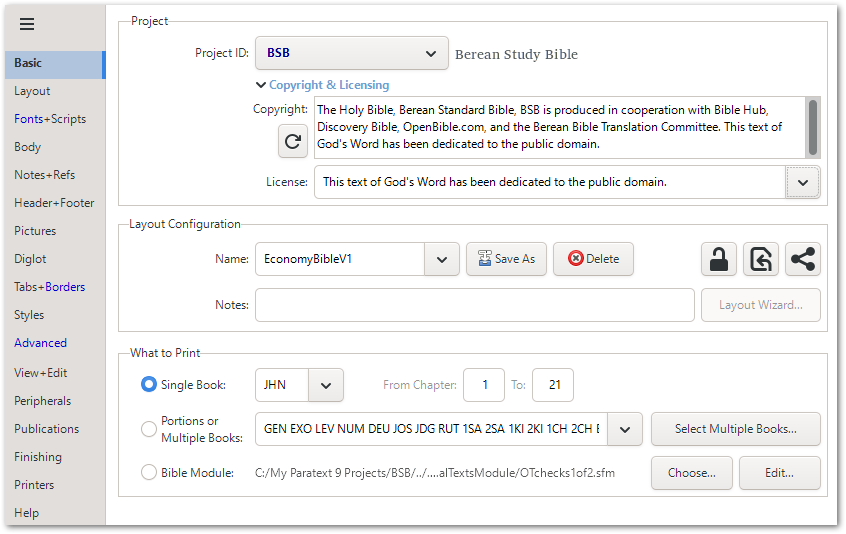
- If PTXprint can’t find a Paratext project, it installs the Berean Standard Bible (BSB) sample project automatically, so you can see results straight away.
- Import… is now the last option in the Project list. It accepts ZIP files containing USFM or USX, and creates BookNames.xml if it is missing.
- The Charis 7.0 font is included with PTXprint and used as the default.
- The Basic tab has been reorganised to be more logical (and the copyright & licensing information is now hidden in a section you can expand).
- The Save and Print buttons stay disabled until a project has been chosen.
- The Help tab has a new button for changing the Base Projects Directory.
- Tabbed PDF Viewer
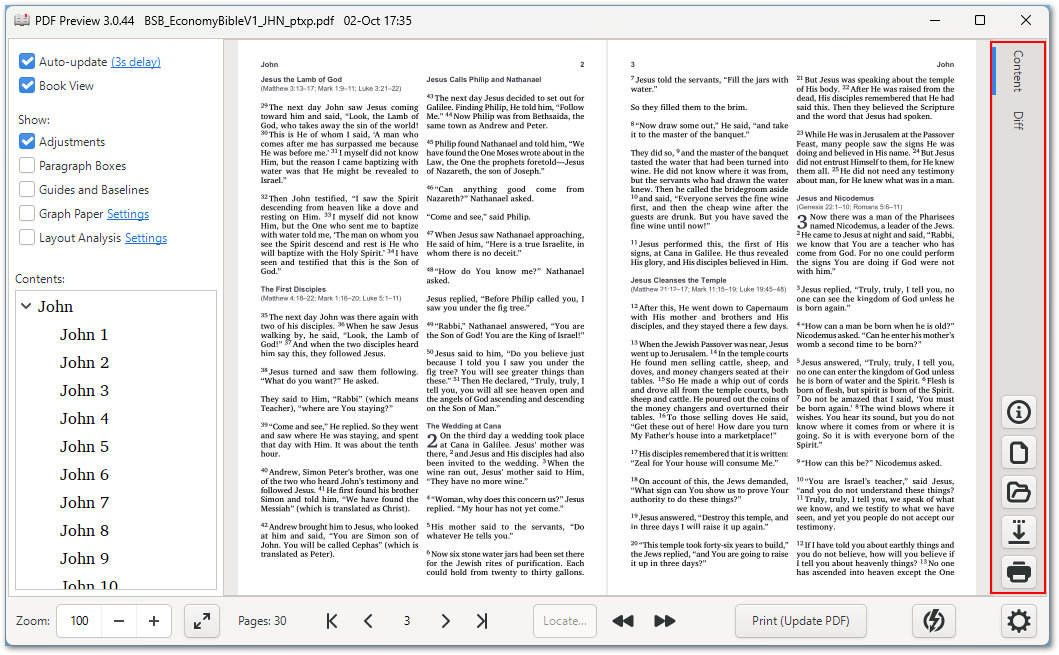
- The PDF Viewer can show several PDFs in tabs: Content, Cover, Diff, Finished and Reference. Tabs that aren’t needed are hidden.
- The cover appears in its own tab, so the separate Print Cover button has been removed.
- The Ornaments Catalogue and the TechRef documentation open in the System’s default PDF viewer and come to the front.
- Improved Styles tab
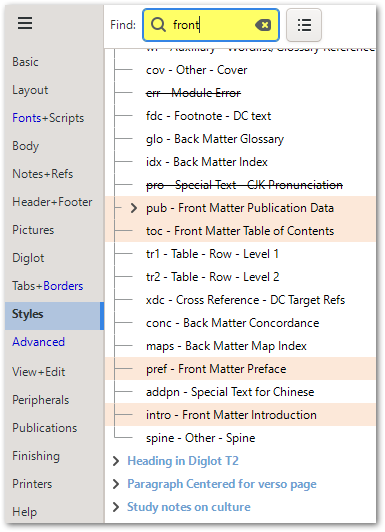
- Search, filter and highlight styles. The list scrolls to the style you are working on.
- “Hide/exclude marker” option is now reversed and worded as “Show contents of marker”, which is easier to understand.
- Layout and typography
- New default poetry indents and heading styles.
- New DoubleSided option (Advanced > Other > Page Layout & Spacing) for two-sided printing where the left and right margins stay the same on odd and even pages.
- Marginal chapter numbers have been reworked to give better control over spacing.
- End of Ayah markers are easier to set up, and a line in the
\vastyle controls how they look. - It is easier to turn on dynamic borders, and their settings are arranged more consistently.
- Illustration credits have been improved, with an option to list all pages.
- Cross-references are no longer links by default, and there are options for the border style of
\jmp/\reflinks.
General enhancements:
- Importing from ZIP files works more predictably.
- Strong’s numbers are processed before local changes, and
\xtscan be used inside\wfor keyword marking. - Support for USFM tag variants such as
\f^98. - Problems with letter spacing are only reported when letter spacing is turned on.
- Unknown-tag error messages are no longer shown.
Minor UI improvements:
- The menu button has moved to the top-left of the main window.
- The Diglot tab layout has been refined.
- Searching for a setting now also highlights matching drop-down lists, which makes settings such as Digit Mapping easier to find.
- The ‘Refresh’ icon on several buttons is clearer.
- The ‘Show USFM codes’ tooltip is clearer and uses Source Code Pro.
- The View+Edit tab now cuts short only .log files. Other files load completely.
- The window position is restored more reliably.
GitHub issues fixed:
#1091, #1110 (partly)
Other bug fixes:
- Fixed crashes when the PDF Viewer updates, and when printing stopped the PDF from updating.
- Fixed text borders, figure borders near peripherals, and map borders (partly).
- Fixed some cases where subheadings on the line grid lost space.
- Fixed strikethrough in styles, and chapters in interlinear text.
- The ‘NoInternet’ setting now really disables all links.
- Fixed finishing-file naming and saving the configuration after loading BSB.
For historical information on what was new in earlier releases, see What’s new in Version 2.